This guide describes the transfer of international domains to our service.
Important to know:
After the transfer, the domain registration period is extended by 1 year. Essentially, the transfer is carried out with simultaneous domain renewal, so this service is chargeable, the cost of which is equal to the domain renewal fee.
The domain must be more than 60 days since its registration.
After the transfer completion, you won’t be able to move the domain to another registrar for 60 days.
Before starting the transfer, please take the following actions:
- Obtain the secret code (Secret code, Auth-Code, Authorization code) from your current registrar, which is needed for the domain transfer.
- Deactivate the domain transfer prohibition (clientTransferProhibited).
- Disable Privacy protection (hiding personal data). An email will be sent to your address with a link to confirm the domain transfer. With Privacy protection enabled, the email will be sent to the wrong address.
Step 1
In the billing panel, select the menu item “Order a domain”.
Enter the domain name, choose the domain zone, and mark the option “transfer domain to us.”
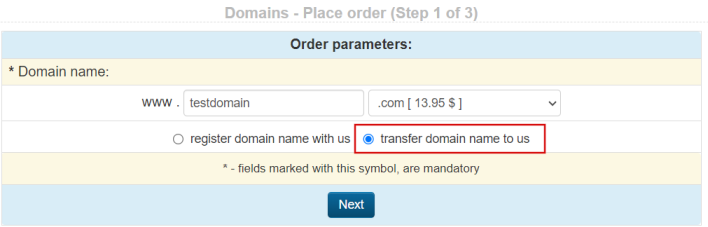
Domain Transfer Step 1
Step 2
On the next step, provide the transfer code obtained from your current registrar, choose a profile, and specify NS records.
After the transfer completion, the domain owner’s data will be updated to the details you provided in your profile.
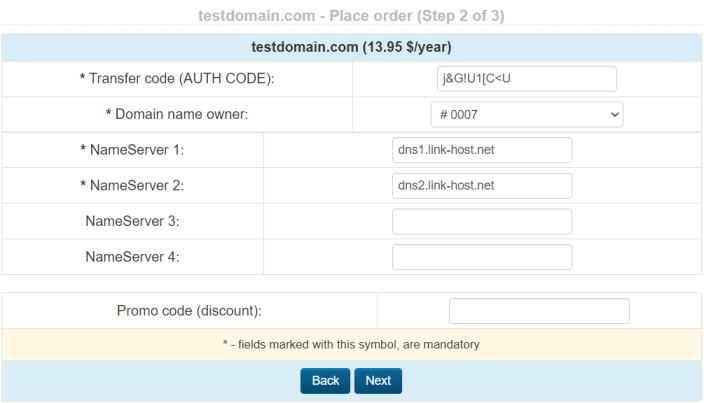
Domain Transfer Step 2
Step 3
In the final step, if all the details are entered correctly, all you need to do is click the “Order” button. After that, an invoice will be generated, and upon its payment, an email will be sent to the domain owner’s address with a link to confirm the transfer.
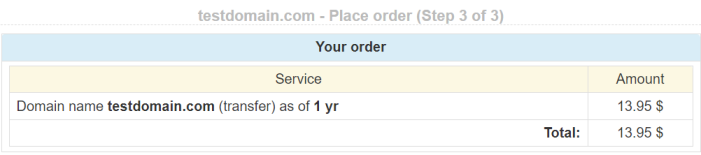
Domain Transfer Step 3
The domain transfer takes 6 days, during which you can cancel the transfer.
